Distributed Systems Simulator - Part 3: Advanced Examples and Protocol API
Published at 2026-04-02T00:00:00+03:00
This is the third and final blog post of the Distributed Systems Simulator series. This part covers advanced simulation examples, the Raft consensus protocol, and the extensible Protocol API.
ds-sim on GitHub (modernized, English-translated version)
These are all the posts of this series:
2026-03-31 Distributed Systems Simulator - Part 1: Introduction and GUI
2026-04-01 Distributed Systems Simulator - Part 2: Built-in Protocols
2026-04-02 Distributed Systems Simulator - Part 3: Advanced Examples and Protocol API (You are currently reading this)
Table of Contents
- Distributed Systems Simulator - Part 3: Advanced Examples and Protocol API
- ⇢ Additional Examples
- ⇢ ⇢ Lamport and Vector Timestamps
- ⇢ ⇢ Simulating Slow Connections
- ⇢ ⇢ Raft Consensus Failover
- ⇢ Protocol API
- ⇢ ⇢ Class Hierarchy
- ⇢ ⇢ Implementing a Custom Protocol
- ⇢ ⇢ Available API Methods
- ⇢ ⇢ Implementing a Custom Protocol
- ⇢ ⇢ Available API Methods
- ⇢ ⇢ Example: Reliable Multicast Implementation
- ⇢ Project Statistics
Additional Examples
Lamport and Vector Timestamps
"For many purposes, it is sufficient that all machines agree on the same time. It is not necessary that this time also agrees with real time, like every hour announced on the radio... For a certain class of algorithms, only the internal consistency of clocks is important." - Andrew Tanenbaum
Clocks that provide such a time are also known as logical clocks. Two implementations are realized in the simulator: Lamport timestamps and vector timestamps.
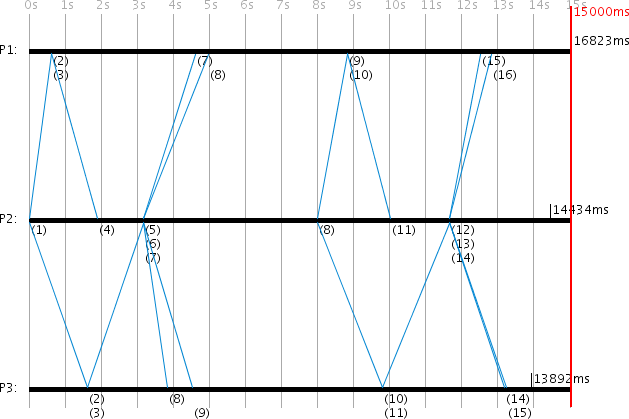
After activating the Lamport time switch in expert mode, the current Lamport timestamp appears at every event of a process. Each process has its own Lamport timestamp that is incremented when a message is sent or received. Each message carries the current Lamport time t_l(i) of the sending process i. When another process j receives this message, its Lamport timestamp t_l(j) is recalculated as:
t_l(j) := 1 + max(t_l(j), t_l(i))
The larger Lamport time of the sender and receiver process is used and then incremented by 1. After the Berkeley simulation shown here, P1 has Lamport timestamp 16, P2 has 14, and P3 has 15.
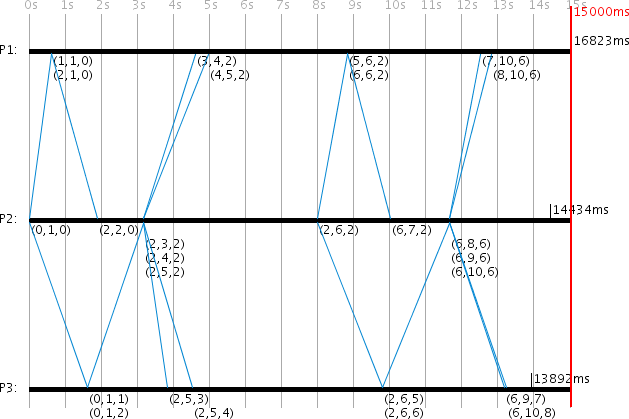
With the active vector time switch, all vector timestamps are displayed. Like the Lamport timestamp, each message includes the current vector timestamp of the sending process. With n participating processes, the vector timestamp v has size n. Each participating process i has its own index, accessible via v(i). When v is the vector timestamp of the receiving process j and w is the vector timestamp of the sending process, the new local vector timestamp of process j is calculated as follows:
for (i := 0; i < n; i++) {
    if (i = j) {
        v(i)++;
    } else if (v(i) < w(i)) {
        v(i) := w(i);
    }
}
By default, the vector timestamp is only incremented when a message is sent or received. In both cases, the sender and receiver each increment their own index in the vector timestamp by 1. Upon receiving a message, the local vector timestamp is then compared with the sender's, and the larger value is taken for all indices.
After the simulation, P1 has vector timestamp (8,10,6), P2 has (6,10,6), and P3 has (6,10,8).
The simulation settings include boolean variables "Lamport times affect all events" and "Vector times affect all events" (both default to false). When set to true, all events (not just message send/receive) will update the timestamps.
Simulating Slow Connections
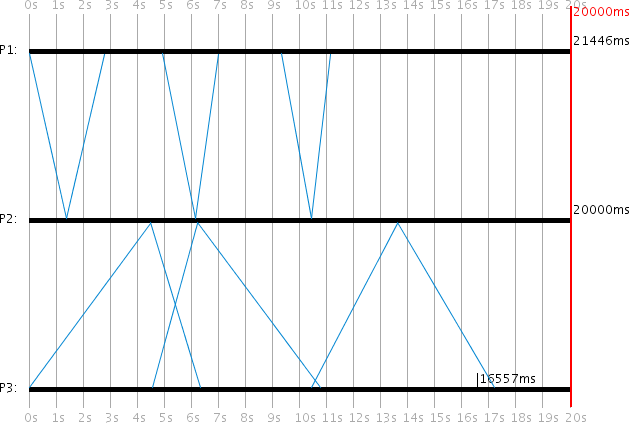
The simulator can also simulate slow connections to a specific process. This example revisits the comparison of Internal Synchronization (P1) and Christian's Method (P3), with P2 serving both. In this scenario, P3 has a poor network connection, so messages to and from P3 always require a longer transmission time.
P3's minimum transmission time is set to 2000ms and maximum to 8000ms, while P1 and P2 keep the defaults (500ms/2000ms). The simulation duration is 20000ms. With the "Average transmission times" setting enabled, the effective transmission time for messages involving P3 is:
1/2 * (rand(500,2000) + rand(2000,8000)) = 1/2 * rand(2500,10000) = rand(1250,5000)ms
Because P3 starts a new request before receiving the answer to its previous one, and because it always associates server responses with its most recently sent request, its RTT calculations become incorrect on each round, and its local time is poorly synchronized. P1 synchronizes to 21446ms (error: -1446ms) while P3 only reaches 16557ms (error: -3443ms).
Raft Consensus Failover
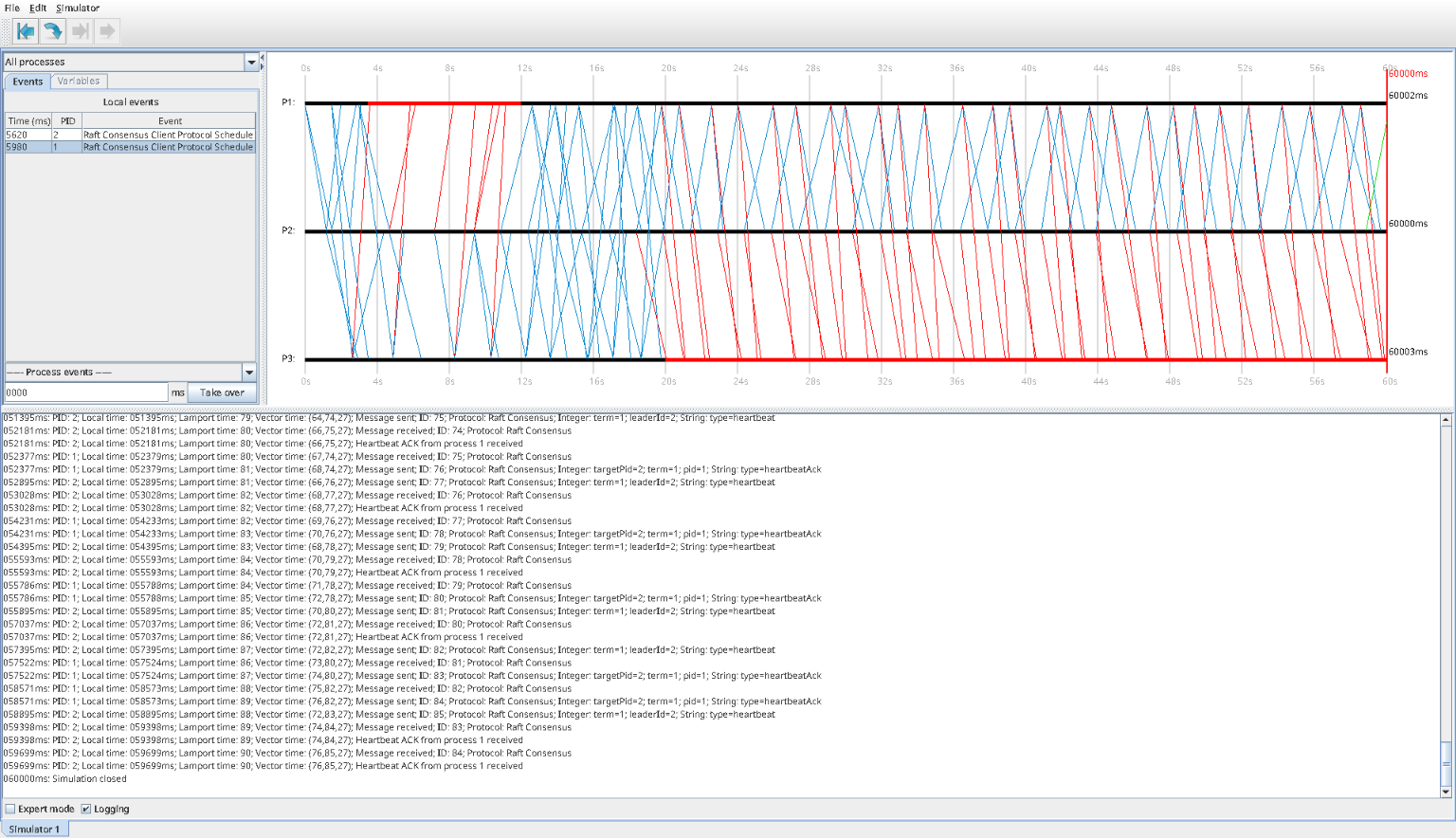
While modernizing ds-sim, I also added a simplified Raft Consensus example. The simulation is intentionally small: three processes, one initial leader, one crash, a clean reelection, a recovery of the old leader, and then another crash later in the run. This makes it possible to see the most important Raft transitions without being overwhelmed by cluster size.
The event log tells a very readable story. At 0ms, P1 starts as the initial leader in term 0. It immediately sends a heartbeat and an appendEntry message carrying the log entry cmd1. P2 joins at 100ms, P3 at 1700ms, and both acknowledge the leader's traffic. At that point the cluster is healthy: one leader, two followers, successful heartbeats, and successful log replication.
At 3500ms, P1 crashes. The followers still process the last in-flight messages, but once the election timeout expires, P2 becomes a candidate and sends a voteRequest for term 1. P3 grants that vote, and at 9395ms the log records the decisive line:
009395ms: PID: 2; ... Leader elected by majority vote: process 2 (term 1)
That transition is followed immediately by new heartbeats and a new appendEntry, so the new leader starts doing leader work right away.
At 12002ms, the old leader P1 recovers. It doesn't try to take the leadership back. It receives heartbeats from P2, answers with heartbeatAck messages, and rejoins as a follower. This is the term-based leadership model in action: a recovered node doesn't become leader again just because it used to be one.
At 20000ms, P3 crashes. The cluster continues running with P2 as leader and P1 as follower for the rest of the 60-second simulation. From then on the log is just heartbeats from P2 and acknowledgments from P1.
So one small run covers startup, replication, leader failure, reelection, reintegration of the old leader, and a follower crash.
In production you'd have to stitch this sequence together from the logs of several nodes. Here it's all in one place.
Protocol API
You can implement your own protocols in Java by extending the VSAbstractProtocol base class. Each of the built-in protocols (the ones covered in Part 2) has its own class in the protocols.implementations package, and they all inherit from VSAbstractProtocol.
Class Hierarchy
VSAbstractEvent
  +-- VSAbstractProtocol (base class for all protocols)
        +-- VSDummyProtocol
        +-- VSPingPongProtocol
        +-- VSBroadcastProtocol
        +-- VSInternalTimeSyncProtocol
        +-- VSExternalTimeSyncProtocol
        +-- VSBerkeleyTimeProtocol
        +-- VSOnePhaseCommitProtocol
        +-- VSTwoPhaseCommitProtocol
        +-- VSBasicMulticastProtocol
        +-- VSReliableMulticastProtocol
Implementing a Custom Protocol
Each protocol class must implement the following methods:
- A public constructor: Must specify whether the client or the server initiates requests, using VSAbstractProtocol.HAS_ON_CLIENT_START or VSAbstractProtocol.HAS_ON_SERVER_START.
- onClientInit() / onServerInit(): Called once before the protocol is first used. Used to initialize protocol variables and attributes via the VSPrefs methods (e.g. initVector, initLong). Variables initialized this way appear in the process editor and can be configured by the user.
- onClientReset() / onServerReset(): Called each time the simulation is reset.
- onClientStart() / onServerStart(): Called when the client/server initiates a request. Typically creates and sends a VSMessage object.
- onClientRecv(VSMessage) / onServerRecv(VSMessage): Called when a message arrives.
- onClientSchedule() / onServerSchedule(): Called when a scheduled alarm fires.
- toString(): Optional. Customizes log output for this protocol.
Available API Methods
Implementing a Custom Protocol
Each protocol class must implement the following methods:
- A public constructor: Must specify whether the client or the server initiates requests, using VSAbstractProtocol.HAS_ON_CLIENT_START or VSAbstractProtocol.HAS_ON_SERVER_START.
- onClientInit() / onServerInit(): Called once before the protocol is first used. Used to initialize protocol variables and attributes via the VSPrefs methods (e.g. initVector, initLong). Variables initialized this way appear in the process editor and can be configured by the user.
- onClientReset() / onServerReset(): Called each time the simulation is reset.
- onClientStart() / onServerStart(): Called when the client/server initiates a request. Typically creates and sends a VSMessage object.
- onClientRecv(VSMessage) / onServerRecv(VSMessage): Called when a message arrives.
- onClientSchedule() / onServerSchedule(): Called when a scheduled alarm fires.
- toString(): Optional. Customizes log output for this protocol.
Available API Methods
No need to list every inherited method here; the generated Javadoc covers the full set. The ones you'll use most: sendMessage() sends a protocol message (and updates the Lamport and vector timestamps), scheduleAt() sets an alarm that fires onClientSchedule() or onServerSchedule(), and removeSchedules() cancels pending alarms. Through the inherited process attribute you get the local and global time, the clock drift, the Lamport and vector timestamps, and the crash state. A VSMessage carries typed key/value data (setBoolean/getBoolean, setInteger/getInteger, setLong/getLong, setString/getString), the message ID, and a reference to the sending process.
Example: Reliable Multicast Implementation
Here is a condensed example showing key parts of the Reliable Multicast Protocol implementation:
public class VSReliableMulticastProtocol extends VSAbstractProtocol {
    public VSReliableMulticastProtocol() {
        // The client initiates requests
        super(VSAbstractProtocol.HAS_ON_CLIENT_START);
        super.setClassname(super.getClass().toString());
    }

    private ArrayList<Integer> pids;

    // Initialize protocol variables (editable in the process editor)
    public void onClientInit() {
        Vector<Integer> vec = new Vector<Integer>();
        vec.add(1); vec.add(3);
        super.initVector("pids", vec, "PIDs of participating processes");
        super.initLong("timeout", 2500, "Time until resend", "ms");
    }

    // Send multicast to all servers that haven't ACKed yet
    public void onClientStart() {
        if (pids.size() != 0) {
            long timeout = super.getLong("timeout") + process.getTime();
            super.scheduleAt(timeout);
            VSMessage message = new VSMessage();
            message.setBoolean("isMulticast", true);
            super.sendMessage(message);
        }
    }

    // Handle ACK from a server
    public void onClientRecv(VSMessage recvMessage) {
        if (pids.size() != 0 && recvMessage.getBoolean("isAck")) {
            Integer pid = recvMessage.getIntegerObj("pid");
            if (pids.contains(pid))
                pids.remove(pid);
            super.log("ACK from Process " + pid + " received!");
            if (pids.size() == 0) {
                super.log("ACKs from all processes received!");
                super.removeSchedules();
            }
        }
    }

    // Retry on timeout
    public void onClientSchedule() { onClientStart(); }
}
Project Statistics
For the record: the 2008 VS-Sim was 61 source files and roughly 15,710 lines of Java 6 across 12 packages; the modernized ds-sim is 146 files (117 main + 29 test) and roughly 27,900 lines (22,400 main + 5,500 test) across 19 packages, plus 208 unit tests, 12 built-in protocols, and 269 configurable settings.
ds-sim source code on GitHub
vs-sim source code on GitHub (original German version, 2008)
Other related posts are:
2026-03-01 Loadbars 0.13.0 released
2022-12-24 (Re)learning Java - My takeaways
2022-03-06 The release of DTail 4.0.0
2016-11-20 Object oriented programming with ANSI C
E-Mail your comments to paul@nospam.buetow.org
Back to the main site