Task Samurai: An agentic coding learning experiment
Published at 2025-06-22T20:00:51+03:00

Table of Contents
- Task Samurai: An agentic coding learning experiment
- ⇢ Introduction
- ⇢ ⇢ Why does this exist?
- ⇢ ⇢ How it works
- ⇢ Where and how to get it
- ⇢ Lessons learned from building Task Samurai with agentic coding
- ⇢ ⇢ Developer workflow
- ⇢ ⇢ How it went
- ⇢ ⇢ What went wrong
- ⇢ ⇢ Patterns that helped
- ⇢ ⇢ What I learned using agentic coding
- ⇢ ⇢ how much time did I save?
- ⇢ Conclusion
Introduction
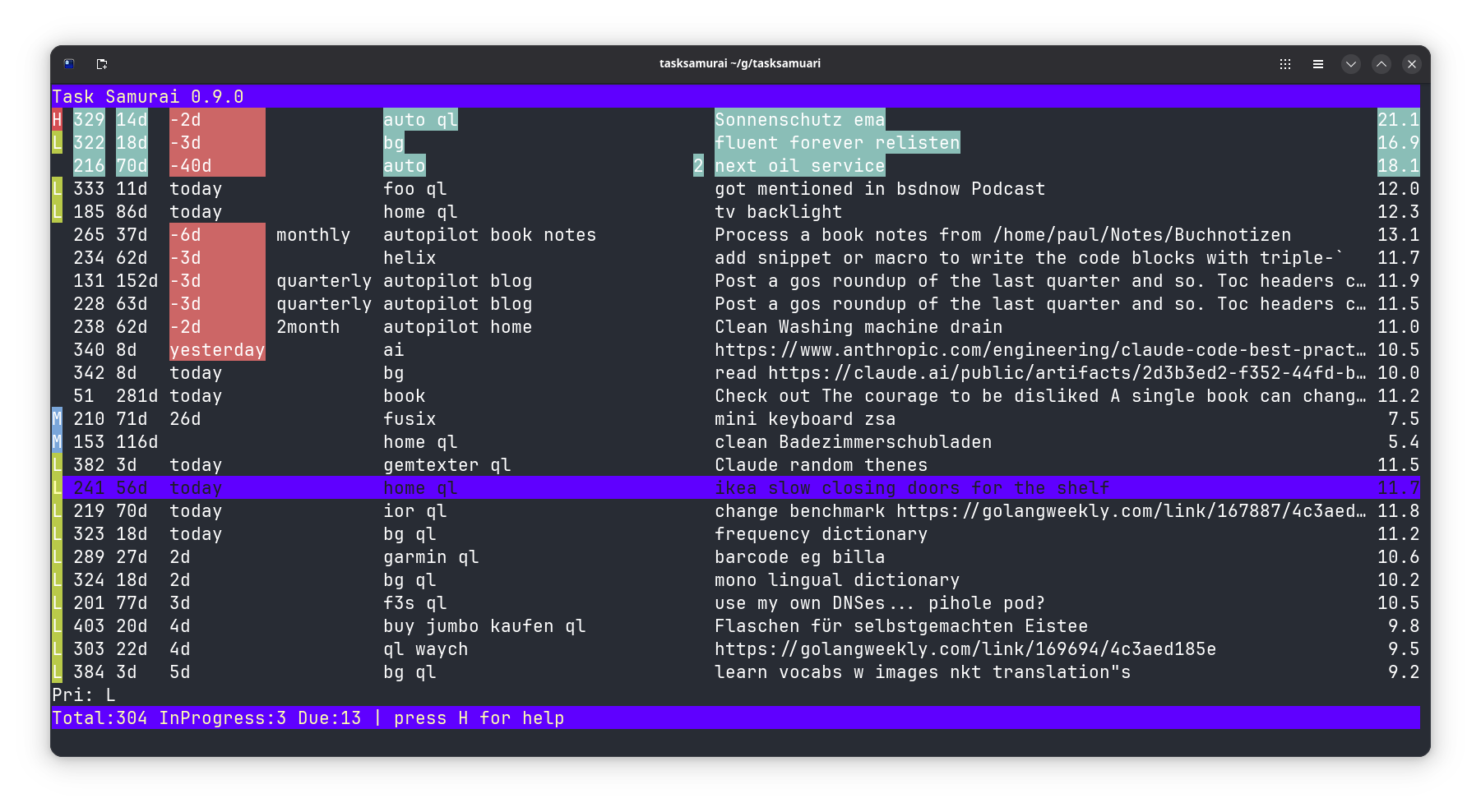
Task Samurai is a fast terminal interface for Taskwarrior written in Go using the Bubble Tea framework. It displays your tasks in a table and allows you to manage them without leaving your keyboard.
https://taskwarrior.org
https://github.com/charmbracelet/bubbletea
Why does this exist?
I wanted to tinker with agentic coding. This project was implemented entirely using OpenAI Codex. (After this blog post was published, I also used the Claude Code CLI.)
- I wanted a faster UI for Taskwarrior than other options, like Vit, which is Python-based.
- I wanted something built with Bubble Tea, but I never had time to dive deep into it.
- I wanted to build a toy project (like Task Samurai) first, before tackling the big ones, to get started with agentic coding.
https://openai.com/codex/
I've been curious about agentic coding for a while and wanted to see what it's actually like to build something with it. So I gave it a go (no pun intended).
How it works
Task Samurai invokes the task command (that's the original Taskwarrior CLI command) to read and modify tasks. The tasks are displayed in a Bubble Tea table, where each row represents a task. Hotkeys trigger Taskwarrior commands such as starting, completing or annotating tasks. The UI refreshes automatically after each action, so the table is always up to date.
Where and how to get it
Go to:
https://github.com/snonux/tasksamurai
And follow the README.md!
Lessons learned from building Task Samurai with agentic coding
Developer workflow
I was trying out OpenAI Codex because I regularly run out of Claude Code CLI (another agentic coding tool I am currently trying out) credits (it still happens!), but Codex was still available to me. So, I took the opportunity to push agentic coding a bit further with another platform.
I didn't really love the web UI you have to use for Codex, as I usually live in the terminal. But this is all I have for Codex for now, and I thought I'd give it a try regardless. The web UI is simple and pretty straightforward. There's also a Codex CLI one could use directly in the terminal, but I didn't get it working. I will try again soon.
Update: Codex CLI now works for me, after OpenAI released a new version!
For every task given to Codex, it spins up its own container. From there, you can drill down and watch what it is doing. At the end, the result (in the form of a code diff) will be presented. From there, you can make suggestions about what else to change in the codebase. What I found inconvenient is that for every additional change, there's an overhead because Codex has to spin up a container and bootstrap the entire development environment again, which adds extra delay. That could be eliminated by setting up predefined custom containers, but that feature still seems somewhat limited.
Once satisfied, you can ask Codex to create a GitHub PR (too bad only GitHub is supported and no other Git hosters); from there, you can merge it and then pull it to your local laptop or workstation to test the changes again. I found myself looping a lot around the Codex UI, GitHub PRs, and local checkouts.
How it went
Task Samurai came together quickly. The entire Git history spans June 19 to 22, 2025, 179 commits in total:
- June 19: Scaffolded the Go boilerplate, set up tests, integrated the Bubble Tea UI framework, and got the first table views showing up.
- June 20: The big one (120 commits!). Added hotkeys, colourized tasks, annotation support, undo/redo, and, for fun, fireworks on quit (which never worked and got removed later). Most of the bugs and merges happened here.
- June 21: Refined searching, theming, and column sizing and documented all those hotkeys. Numerous tweaks to make the UI cleaner and more user-friendly.
- June 22: Final touches: screenshots, logo, module paths. Done.
I worked on it in the evenings when I had some free time, as I also had to fit in my regular work and family commitments during the day. So, I didn't spend full working days on this project.
What went wrong
It wasn't all smooth:
- Merge floods: Every minor feature or fix got its own branch, so I was merging constantly. The Git history is full of noise and there was the occasional conflict. This seems to be a Codex thing; I didn't see it as much with Claude Code CLI (not covered in this blog post).
- Fixes on fixes: Features like "fireworks on exit" had chains of "fix exit," "fix cell selection," etc. Sometimes, new additions introduced bugs that needed rapid patching.
Patterns that helped
What helped:
- Scaffolding first: I started with the basic table UI and command wrappers, then added features on top. Never the other way around.
- Tiny PRs: Small merges meant fast feedback (and fast fixes).
- Tests: A base of unit tests for the task manipulations kept things from breaking completely while experimenting.
- Docs: The README got updated with every hotkey and feature change.
Maybe a better approach would have been to design the whole application from scratch before letting Codix do any of the coding. I will try that with my next toy project.
What I learned using agentic coding
Using Codex as my "pair programmer" was a big shift. You have to steer it and check every line, and things move fast. I must admit, I sometimes lost track of what all the generated code was actually doing. But the features seemed to work after a few iterations, so I was satisfied. Which is a bit concerning. Imagine if I approved a PR for a production-grade deployment without fully understanding what it was doing (and not a toy project like in this post).
how much time did I save?
Did it buy me speed?
- Say each commit takes Codex 5 minutes to generate, and you need to review/guide 179 commits = about _6 hours of active development_.
- If you coded it all yourself, including all the bug fixes, features, design, and documentation, you might spend _10–20 hours_.
- That's a couple of days saved, and I am by no means an expert in agentic coding. This was my first completed agentic coding project.
Conclusion
Building Task Samurai this way was a wild ride: lots of features, lots of quick fixes, and more merge commits than I'd expected. Next time I'll try the opposite: a complete design first, then let the agent generate code. Still, shipping a terminal UI in days instead of weeks is not bad.
Am I an agentic coding expert now? I don't think so. There's still a lot to learn, and the tools keep changing.
While working on Task Samurai, there were times I missed manual coding and the satisfaction that comes from writing every line yourself, debugging issues manually, and crafting solutions from scratch. However, this is the direction in which the industry seems to be shifting, unfortunately. If applied correctly, AI will boost performance, and if you don't use AI, your next performance review may be awkward.
Personally, I am not sure whether I like where the industry is going with agentic coding. I love "traditional" coding, and with agentic coding you operate at a higher level and don't interact directly with code as often, which I would miss. I think that in the future, designing, reviewing, and being able to read and understand code will be more important than writing code by hand.
Do you have any thoughts on that? I hope, I am partially wrong at least.
E-Mail your comments to paul@nospam.buetow.org :-)
Other related posts are:
2026-10-07 Running LLMs by myself - Part 2: The pi coding agent
2026-10-06 Running LLMs by myself - Part 1: Hyperstack and vLLM
2025-08-05 Local LLM for Coding with Ollama on macOS
2025-06-22 Task Samurai: An agentic coding learning experiment (You are currently reading this)
Back to the main site