Local LLM for Coding with Ollama on macOS
Published at 2025-08-04T16:43:39+03:00, last updated Sat 03 Oct 18:26:24 EEST 2026
Updated Sat 03 Oct 2026: This post is obsolete. I still use Ollama to run models, but for local agentic coding I moved to the pi coding agent. Point it at Ollama (or another model server) and a newer Qwen. Qwen3.8 27B is very good when your VRAM or unified memory can hold it; otherwise pick a smaller Qwen that fits.
Pi coding agent
      [::]
     _|  |_
   /  o  o  \                       |
  |    ∆    |  <-- Ollama          / \
  |  \___/  |                     /   \
   \_______/             LLM --> / 30B \
    |     |                     / Qwen3 \
   /|     |\                   /  Coder  \
  /_|     |_\_________________/ quantised \
Table of Contents
- Local LLM for Coding with Ollama on macOS
- ⇢ Why Local LLMs?
- ⇢ Hardware Considerations
- ⇢ Basic Setup and Manual Code Prompting
- ⇢ ⇢ Installing Ollama and a Model
- ⇢ ⇢ Example Usage
- ⇢ Agentic Coding with Aider
- ⇢ ⇢ Installation
- ⇢ ⇢ Agentic coding prompt
- ⇢ ⇢ Compilation & Execution
- ⇢ ⇢ The code
- ⇢ In-Editor Code Completion
- ⇢ ⇢ Installation of lsp-ai
- ⇢ ⇢ Helix Configuration
- ⇢ ⇢ Code completion in action
- ⇢ Conclusion
With all the AI buzz around coding assistants, and being a bit concerned about being dependent on third-party cloud providers here, I decided to explore the capabilities of local large language models (LLMs) using Ollama.
Ollama runs LLMs on your own hardware. No cloud. This post is about my first setup and experiences with it, mostly for coding and agentic coding.
https://ollama.com/
Why Local LLMs?
Why local? My code stays on my machine, there's no API bill, and it works offline. It's not faster, though. I mostly found Ollama slower than the commercial providers. That may change with better models and hardware.
Hardware Considerations
Running large language models locally is currently limited by consumer hardware capabilities:
- GPU Memory: Most consumer-grade GPUs (even in 2025) top out at 16–24GB of VRAM, making it challenging to run larger models like the 30B (30 billion) parameter LLMs (they go up to the 100 billion and more).
- RAM Constraints: On my MacBook Pro with M3 CPU and 36GB RAM, I chose a 14B model (qwen2.5-coder:14b-instruct) as it's the biggest model that runs comfortably on it.
Roughly, this is how model size maps to hardware:
- Models larger than 30B: I don't even think about running them locally. One (e.g. from Qwen, Deepseek or Kimi K2) with several hundred billion parameters could match the "performance" of commercial LLMs (Claude Sonnet 4, etc). Still, for personal use, the hardware demands are just too high (or temporarily "rent" it via the public cloud?).
- 30B models: Require at least 48GB of GPU VRAM for full inference without quantisation. Currently only feasible on high-end professional GPUs (or an Apple-silicone Mac with enough unified RAM).
- 14B models: Can run with 16-24GB GPU memory (VRAM), suitable for consumer-grade hardware (or use a quantised larger model)
- 7B-13B models: Run on pretty much any consumer GPU, but they are noticeably dumber and hallucinate more.
The model I'll be mainly using in this blog post (qwen2.5-coder:14b-instruct) is particularly interesting as:
- instruct: Indicates this is the instruction-tuned variant, optimised for diverse tasks including coding
- coder: Tells me that this model was trained on a mix of code and text
https://ollama.com/library/qwen2.5-coder
https://huggingface.co/Qwen/Qwen2.5-Coder-14B-Instruct
For general thinking tasks, I found deepseek-r1:14b to be useful (in the future, I also want to try other qwen models here). I actually used deepseek-r1:14b to format this post and fix some of my English. It also helped me clarify a few of the technical explanations. All locally on the MacBook Pro. Admittedly, it was a lot slower than "just using ChatGPT", but still within a minute or so.
https://ollama.com/library/deepseek-r1:14b
https://huggingface.co/deepseek-ai/DeepSeek-R1
Quantised (as mentioned above) means the model's weights were converted from 16- or 32-bit floats to something smaller, like 8-bit integers. The model gets a lot smaller and faster, and fits into less VRAM. The price is some accuracy, and sometimes weird output in edge cases.
Basic Setup and Manual Code Prompting
Installing Ollama and a Model
To install Ollama, performed these steps (this assumes that you have already installed Homebrew on your macOS system):
brew install ollama
rehash
ollama serve
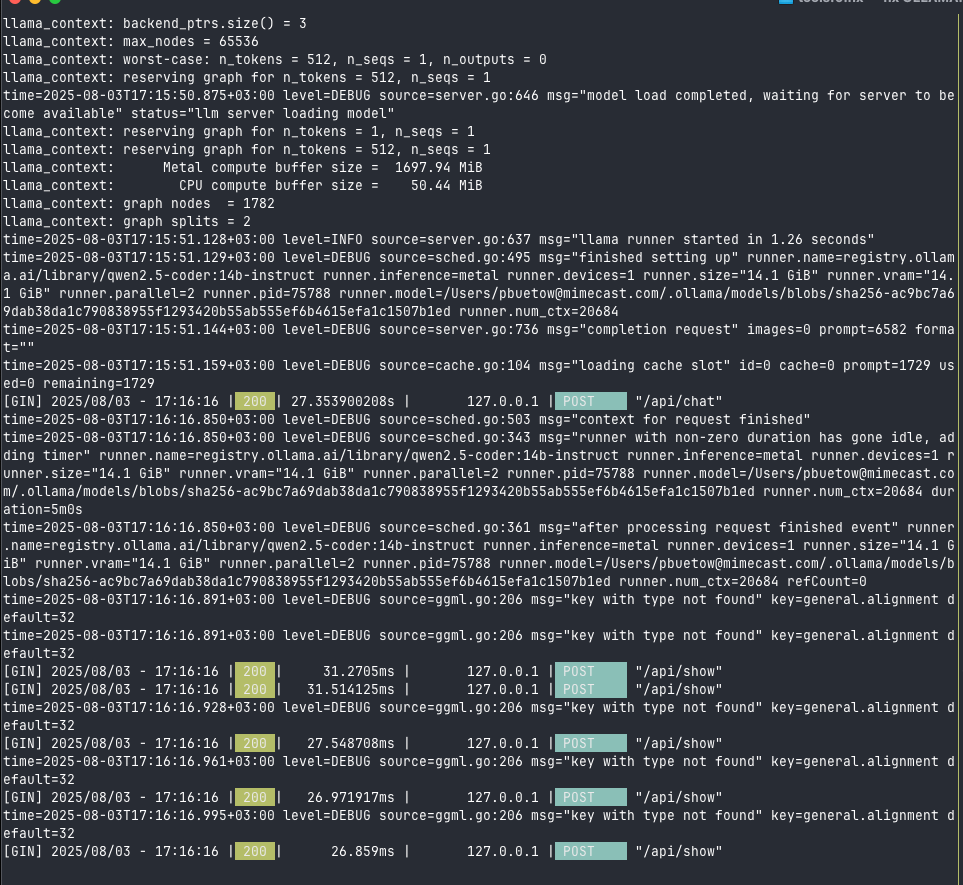
Which started up the Ollama server with something like this (the screenshots shows already some requests made):
And then, in a new terminal, I pulled the model with:
ollama pull qwen2.5-coder:14b-instruct
Now, I was ready to go! It wasn't so difficult. Now, let's see how I used this model for coding tasks.
Example Usage
I run the following command to get a Go function for calculating Fibonacci numbers:
time echo "Write a function in golang to print out the Nth fibonacci number, \
  only the function without the boilerplate" | ollama run qwen2.5-coder:14b-instruct

Output:

func fibonacci(n int) int {
    if n <= 1 {
        return n
    }
    a, b := 0, 1
    for i := 2; i <= n; i++ {
        a, b = b, a+b
    }
    return b
}

Execution Metrics:

Executed in    4.90 secs      fish           external
   usr time   15.54 millis    0.31 millis   15.24 millis
   sys time   19.68 millis    1.02 millis   18.66 millis
Note, after having written this blog post, I tried the same with the newer model qwen3-coder:30b-a3b-q4_K_M (which "just" came out, and it's a quantised 30B model), and it was much faster:
Executed in    1.83 secs      fish           external
   usr time   17.82 millis    4.40 millis   13.42 millis
   sys time   17.07 millis    1.57 millis   15.50 millis
https://ollama.com/library/qwen3-coder:30b-a3b-q4_K_M
Agentic Coding with Aider
Installation
Aider is an agentic coding tool, and it works with local models too. While setting up OpenAI Codex and OpenCode with Ollama proved challenging (those tools either didn't know how to work with the "tools" (the capability to execute external commands or to edit files for example) or didn't connect at all to Ollama for some reason), Aider worked smoothly.
To get started, the only thing I had to do was to install it via Homebrew, initialise a Git repository, and then start Aider with the Ollama model ollama_chat/qwen2.5-coder:14b-instruct:
brew install aider
mkdir -p ~/git/aitest && cd ~/git/aitest && git init
aider --model ollama_chat/qwen2.5-coder:14b-instruct
https://aider.chat
https://opencode.ai
https://github.com/openai/codex
Agentic coding prompt
This is the prompt I gave:
Create a Go project with these files:

* `cmd/aitest/main.go`: CLI entry point
* `internal/version.go`: Version information (0.0.0), should be printed when the
   program was started with `-version` flag
* `internal/count.go`: File counting functionality, the program should print out
   the number of files in a given subdirectory (the directory is provided as a
   command line flag with `-dir`), if none flag is given, no counting should be
   done
* `README.md`: Installation and usage instructions
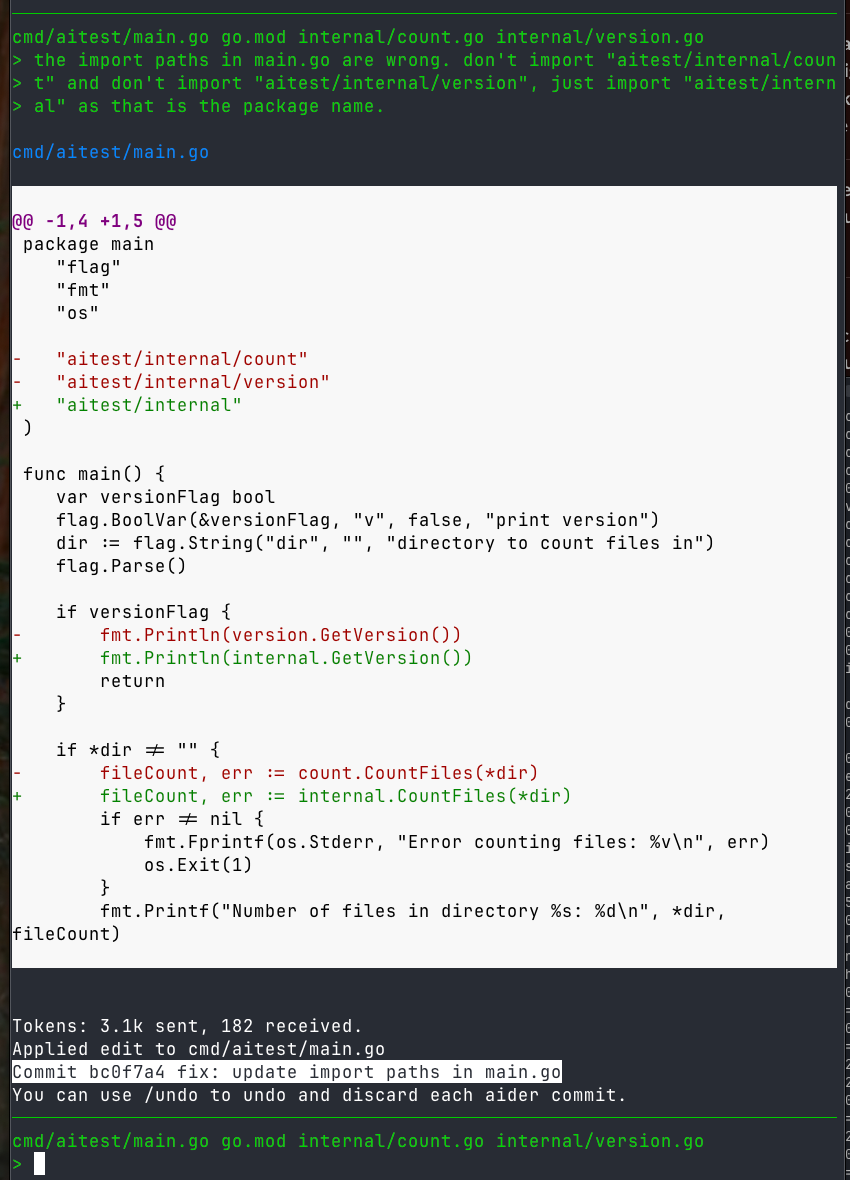
It then generated something, but did not work out of the box, as it had some issues with the imports and package names. So I had to do some follow-up prompts to fix those issues with something like this:
* Update import paths to match module name, github.com/yourname/aitest should be
  aitest in main.go
* The package names of internal/count.go and internal/version.go should be
  internal, and not count and version.
Compilation & Execution
Once done so, the project was ready and I could compile and run it:
go build cmd/aitest/main.go
./main -v
0.0.0
./main -dir .
Number of files in directory .: 4
The code
The code it generated was simple, but functional. The ./cmd/aitest/main.go file:
package main

import (
	"flag"
	"fmt"
	"os"

	"aitest/internal"
)

func main() {
	var versionFlag bool
	flag.BoolVar(&versionFlag, "v", false, "print version")
	dir := flag.String("dir", "", "directory to count files in")
	flag.Parse()

	if versionFlag {
		fmt.Println(internal.GetVersion())
		return
	}

	if *dir != "" {
		fileCount, err := internal.CountFiles(*dir)
		if err != nil {
			fmt.Fprintf(os.Stderr, "Error counting files: %v\n", err)
			os.Exit(1)
		}
		fmt.Printf("Number of files in directory %s: %d\n", *dir, fileCount)
	} else {
		fmt.Println("No directory specified. No count given.")
	}
}
The ./internal/version.go file:
package internal

var Version = "0.0.0"

func GetVersion() string {
	return Version
}
The ./internal/count.go file:
package internal

import (
	"os"
)

func CountFiles(dir string) (int, error) {
	files, err := os.ReadDir(dir)
	if err != nil {
		return 0, err
	}

	count := 0
	for _, file := range files {
		if !file.IsDir() {
			count++
		}
	}

	return count, nil
}
The code is quite straightforward, especially for generating boilerplate code this will be useful for many use cases!
In-Editor Code Completion
I also wired Ollama into Helix, my editor, for code completion. Helix speaks LSP, and lsp-ai is an LSP server that talks to Ollama.
https://helix-editor.com
https://github.com/SilasMarvin/lsp-ai
Installation of lsp-ai
I installed lsp-ai via Rust's Cargo package manager. (If you don't have Rust installed, you can install it via Homebrew as well.):
cargo install lsp-ai
Helix Configuration
I edited ~/.config/helix/languages.toml to include:
[[language]]
name = "go"
auto-format= true
diagnostic-severity = "hint"
formatter = { command = "goimports" }
language-servers = [ "gopls", "golangci-lint-lsp", "lsp-ai", "gpt" ]
Note that there is also a gpt language server configured, which is for GitHub Copilot, but it is out of scope of this blog post. Let's also configure lsp-ai settings in the same file:
[language-server.lsp-ai]
command = "lsp-ai"

[language-server.lsp-ai.config.memory]
file_store = { }

[language-server.lsp-ai.config.models.model1]
type = "ollama"
model =  "qwen2.5-coder"

[language-server.lsp-ai.config.models.model2]
type = "ollama"
model = "mistral-nemo:latest"

[language-server.lsp-ai.config.models.model3]
type = "ollama"
model = "deepseek-r1:14b"

[language-server.lsp-ai.config.completion]
model = "model1"

[language-server.lsp-ai.config.completion.parameters]
max_tokens = 64
max_context = 8096

## Configure the messages per your needs
[[language-server.lsp-ai.config.completion.parameters.messages]]
role = "system"
content = "Instructions:\n- You are an AI programming assistant.\n- Given a
piece of code with the cursor location marked by \"<CURSOR>\", replace
\"<CURSOR>\" with the correct code or comment.\n- First, think step-by-step.\n
- Describe your plan for what to build in pseudocode, written out in great
detail.\n- Then output the code replacing the \"<CURSOR>\"\n- Ensure that your
completion fits within the language context of the provided code snippet (e.g.,
Go, Ruby, Bash, Java, Puppet DSL).\n\nRules:\n- Only respond with code or
comments.\n- Only replace \"<CURSOR>\"; do not include any previously written
code.\n- Never include \"<CURSOR>\" in your response\n- If the cursor is within
a comment, complete the comment meaningfully.\n- Handle ambiguous cases by
providing the most contextually appropriate completion.\n- Be consistent with
your responses."

[[language-server.lsp-ai.config.completion.parameters.messages]]
role = "user"
content = "func greet(name) {\n    print(f\"Hello, {<CURSOR>}\")\n}"

[[language-server.lsp-ai.config.completion.parameters.messages]]
role = "assistant"
content = "name"

[[language-server.lsp-ai.config.completion.parameters.messages]]
role = "user"
content = "func sum(a, b) {\n    return a + <CURSOR>\n}"

[[language-server.lsp-ai.config.completion.parameters.messages]]
role = "assistant"
content = "b"

[[language-server.lsp-ai.config.completion.parameters.messages]]
role = "user"
content = "func multiply(a, b int ) int {\n    a * <CURSOR>\n}"

[[language-server.lsp-ai.config.completion.parameters.messages]]
role = "assistant"
content = "b"

[[language-server.lsp-ai.config.completion.parameters.messages]]
role = "user"
content = "// <CURSOR>\nfunc add(a, b) {\n    return a + b\n}"

[[language-server.lsp-ai.config.completion.parameters.messages]]
role = "assistant"
content = "Adds two numbers"

[[language-server.lsp-ai.config.completion.parameters.messages]]
role = "user"
content = "// This function checks if a number is even\n<CURSOR>"

[[language-server.lsp-ai.config.completion.parameters.messages]]
role = "assistant"
content = "func is_even(n) {\n    return n % 2 == 0\n}"

[[language-server.lsp-ai.config.completion.parameters.messages]]
role = "user"
content = "{CODE}"
As you can see, I have also added other models, such as Mistral Nemo and DeepSeek R1, so that I can switch between them in Helix. Other than that, the completion parameters are interesting. They define how the LLM should interact with the text in the text editor based on the given examples.
If you want to see more lsp-ai configuration examples, they are some for Vim and Helix in the lsp-ai git repository!
Code completion in action
The screenshot shows how Ollama's qwen2.5-coder model provides code completion suggestions within the Helix editor. LSP auto-completion is triggered by leaving the cursor at position <CURSOR> for a short period in the code snippet, and Ollama sends back a completion.
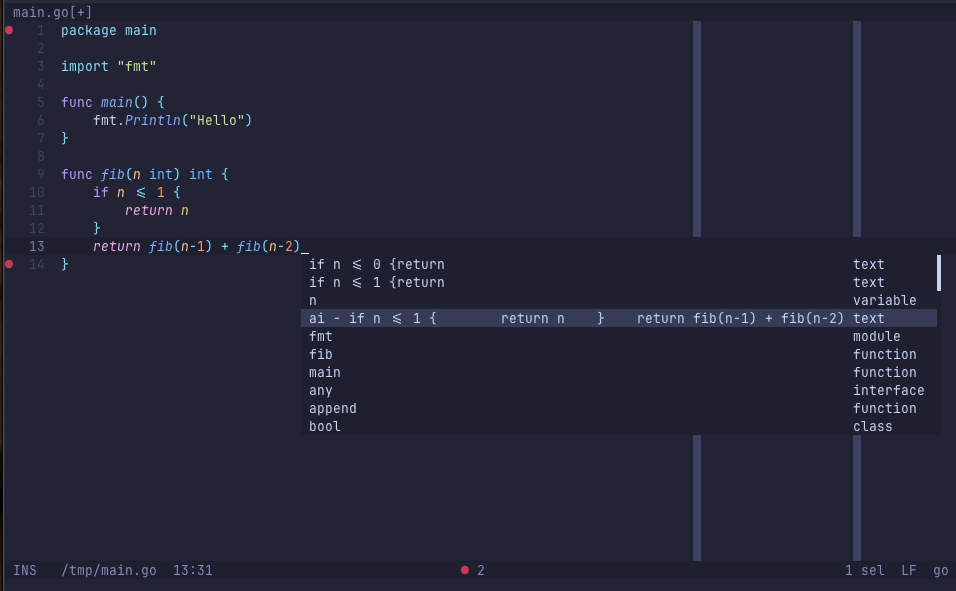
In the LSP auto-completion, the one prefixed with ai - was generated by qwen2.5-coder, the other ones are from other LSP servers (GitHub Copilot, Go linter, Go language server, etc.).
I found GitHub Copilot to be still faster than qwen2.5-coder:14b, but the local LLM one is actually workable for me already. And, as mentioned earlier, local LLMs will only get better.
After trying qwen3-coder:30b-a3b-q4_K_M (following the publication of this blog post), it was much faster and more capable. Honestly, my local setup already handles routine coding stuff better than I expected.
Conclusion
Will there ever be a time we can run larger models (60B, 100B, ...and larger) on consumer hardware, or even on our phones? We are not quite there yet, but I am optimistic that we will see improvements in the next few years. Hardware gets cheaper, models get more efficient. We'll see.
For now, even the models listed in this blog post are very promising already, and they run on consumer-grade hardware (at least in the realm of the initial tests I've performed... the ones in this blog post are overly simplistic, though! But they were good for getting started with Ollama and initial demonstration)! I'll keep playing with Ollama and other local LLMs. I may cancel my Copilot subscription, which I currently use only for in-editor auto-completion, at some point.
However, truth be told, I don't think the setup described in this blog post currently matches the performance of commercial models like Claude Code (Sonnet 4, Opus 4), Gemini 2.5 Pro, the OpenAI models and others. Maybe we could get close if we had the high-end hardware needed to run the largest Qwen Coder model available. But, as mentioned already, that is out of reach for occasional coders like me. Furthermore, I want to continue coding manually to some degree, as otherwise I will start to forget how to write for-loops, which would be awkward... However, do we always need the best model when AI can help generate boilerplate or repetitive tasks even with smaller models?
E-Mail your comments to paul@nospam.buetow.org :-)
Other related posts are:
2026-10-07 Running LLMs by myself - Part 2: The pi coding agent
2026-10-06 Running LLMs by myself - Part 1: Hyperstack and vLLM
2025-08-05 Local LLM for Coding with Ollama on macOS (You are currently reading this)
2025-06-22 Task Samurai: An agentic coding learning experiment
Back to the main site